Most businesses know AI matters. Few know where to start.
If you are weighing up a chatbot against an AI agent, the first question is not which tool sounds more advanced. It is what business outcome you want to change, and what level of support your team needs to get there.
For SMEs, that distinction matters. A chatbot can reduce repetitive questions and make approved information easier to find. An AI agent can move work through a process, update systems, and remove manual handling. The commercial value comes from choosing the right fit for the task.
We see this in Discovery Workshop and Opportunity Assessment work all the time. Leadership teams often begin with a technology question. Once we look at the process, the real issue is usually response time, handoffs, or capacity. That is where practical AI delivery creates measurable value.
Business-led advice. Practical AI delivery.
Which tool solves which problem?
Chatbots and AI agents are both useful. They just solve different problems.
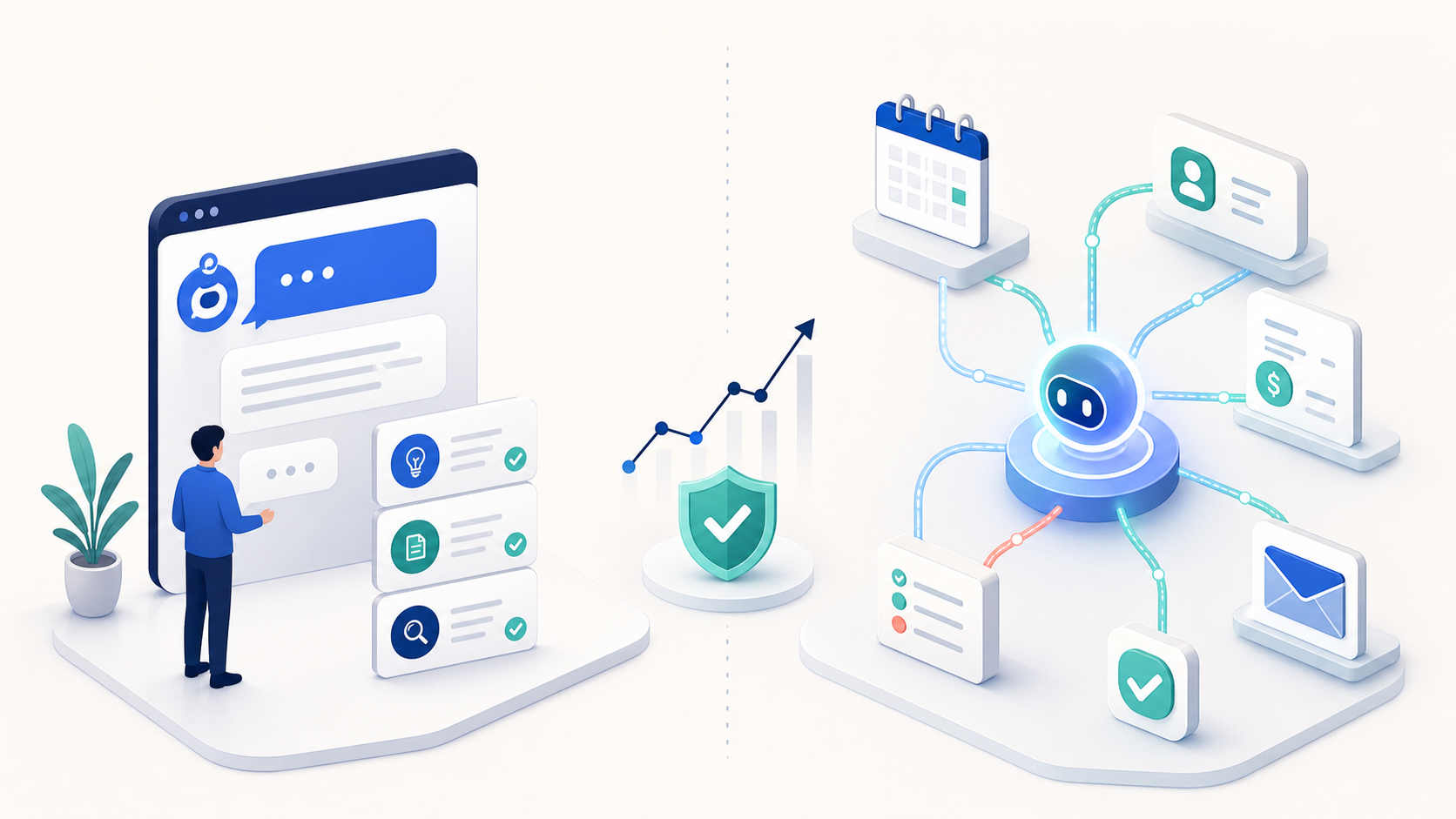
A chatbot is built for conversation. It answers questions, guides users, gathers details, and points people to the right place.
An AI agent is built for action. It can check information, choose from permitted steps, complete tasks in connected systems, and move work forward.
That difference changes the outcome.
A chatbot can reduce interruptions.
An AI agent can reduce handoffs.
A chatbot can improve consistency.
An AI agent can create capacity.
For SMEs, that is the key commercial decision. Not which option is more impressive, but which one removes the friction that costs time and money.
A clear comparison for leadership teams
The table below gives a practical view of how the two approaches differ.
| Area | Chatbot | AI agent |
|---|---|---|
| Main job | Answer questions, guide users, capture details | Complete tasks, take actions, move work through a process |
| Best for | FAQs, internal knowledge, basic triage | Workflow automation, case handling, record updates, routing |
| System access | Limited or read-only in many cases | Often connected to CRM, email, ticketing, databases, and other systems |
| Risk profile | Lower, if kept within approved content | Higher, because it can act across systems |
| Cost to start | Usually lower | Usually higher |
| Best fit | Faster access to information | Reduced manual work and greater capacity |
| Adoption challenge | Making staff trust the answer | Making staff trust the action and the controls |
The useful point is straightforward. Chatbots answer. AI agents act.
What chatbots do well
Chatbots work best when the task is narrow, repeatable, and mostly about information access.
They are a strong fit for:
- Customer service FAQs
- Website pre-sales questions
- Internal policy and HR queries
- IT helpdesk triage
- Onboarding support
- Meeting or document search inside a knowledge base
- Capturing basic details before a human takes over
- Routing enquiries to the right person or team
For many SMEs, that is enough to make a meaningful difference. A well-designed chatbot can stop the same question landing in inboxes, Teams channels, or helpdesk queues all day.
That matters when knowledge sits in too many places. Staff waste time searching for the latest policy, template, or process. A chatbot can become a single front door to approved information.
The limits matter too. Chatbots work best when the content is current, the scope is clear, and the answer does not depend on live data or a chain of actions. Once the task becomes conditional or process-driven, a chatbot usually needs human support or a connected workflow behind it.
What AI agents do well
AI agents are useful when the business needs to move work through a defined process with fewer manual steps.
They suit tasks such as:
- Checking information across systems
- Updating records or tickets
- Routing requests based on rules and context
- Preparing first-draft outputs for review
- Monitoring triggers and acting when conditions are met
- Coordinating several steps that would otherwise be done by hand
- Supporting workflow automation across sales, service, finance, or operations
A practical example is lead handling. A chatbot can capture the enquiry and answer basic questions. An AI agent can go further. It can qualify the lead against agreed criteria, enrich the record, update the CRM, assign ownership, and create the follow-up task.
That is a different commercial outcome. The business is not just improving response speed. It is removing manual effort from a repeatable process.
Another example is internal operations. A chatbot can tell a colleague where to find the policy. An AI agent can take the request, check a live system, create the right ticket, route it to the right owner, and prepare the next step for approval.
That is where AI starts to create capacity. Not just convenience.
How the architecture differs
The architecture behind a chatbot is usually lighter. It is designed to respond, not to coordinate multiple actions.
A typical chatbot setup may include:
- A user interface on a website, app, or internal channel
- A language model or scripted dialogue engine
- A knowledge base or approved content source
- Basic escalation rules to a human
- Logging and monitoring
Some chatbots answer from fixed content. Others use retrieval to find relevant information before generating a response. Either way, the job remains conversation-led.
An AI agent needs more moving parts because it has to do more work.
A common agent setup may include:
- A user interface or trigger point
- A language model for reasoning and language output
- An orchestration layer to manage the steps
- Access to tools such as CRM, email, calendars, ticketing, databases, or internal systems
- State tracking so it knows where it is in the task
- Guardrails, permissions, approvals, and logging
- Error handling and human review points
That extra complexity is where value and risk sit side by side. An agent can do more, but it can also touch live business systems. That means tighter controls, clearer permissions, and stronger testing are essential.
For SMEs, this is often the point where an AI Roadmap becomes useful. It stops the business jumping straight to implementation before the process, controls, and adoption plan are ready.
How they behave in practice
The easiest way to think about the difference is this.
A chatbot behaves like a front desk assistant. It listens, answers, signposts, and passes things on.
An AI agent behaves more like a junior operator working within defined rules. It can carry out a task, check conditions, and move work forward.
That difference shows up in three areas:
- Scope: Chatbots stay inside conversation. Agents cross into action.
- Autonomy: Chatbots respond. Agents choose from permitted steps.
- Risk: Chatbots can misanswer. Agents can misfire across systems if they are poorly controlled.
That is why we do not start with the tool. We start with the business task, the risk attached to it, and the level of control required.
If the main need is a better answer, a chatbot is often the right first step.
If the main need is less manual handling across systems, an AI agent may be the better fit.
When a chatbot is the better choice
Chatbots are usually the better first move when the business wants faster access to information without changing the underlying process.
They are a good fit for:
- Customer service FAQs
- Website pre-sales questions
- Internal policy and HR queries
- IT helpdesk triage
- Onboarding support
- Document or meeting search inside a knowledge base
In SMEs, this can remove a surprising amount of low-value interruption. It can also improve consistency because everyone gets the same approved answer.
That consistency matters. When knowledge is spread across people and documents, the risk of different versions of the truth grows quickly. A chatbot can help create clarity without forcing a major process change.
The limitation is clear. If the answer depends on live data, judgement, or action in a system, a chatbot will usually need a human handover or a connected workflow behind it.
When an AI agent is the better choice
AI agents are a stronger fit when the business needs to move work through a process with fewer handoffs.
They are useful for:
- Lead qualification and routing
- Quote or proposal preparation support
- Case triage in service teams
- Internal request handling
- Finance admin checks
- Report generation from multiple systems
- Customer follow-up workflows
- Document processing and record updates
These are rarely one-step tasks. They involve reading context, applying rules, checking data, and taking the next step.
A strong indicator that an AI agent may add value is this: a member of staff keeps doing the same sequence of actions after every enquiry, request, or trigger. If the sequence is repeatable, and the rules are clear enough, an agent can remove much of the manual handling.
That does not mean full autonomy is the answer. In most SMEs, the best designs are supervised. The agent drafts, checks, routes, or updates. A person approves the high-risk step.
That approach tends to deliver better adoption as well. People trust systems more when the boundaries are clear.
Costs: what businesses should expect
Cost is not just the licence fee. It includes design, integration, testing, maintenance, and adoption support.
Chatbots are usually cheaper to start.
Typical cost drivers include:
- Platform or model licensing
- Knowledge base setup
- Content preparation
- Basic integrations
- Conversation design
- Testing and tuning
That makes them a sensible first step when the business wants visible value without a large implementation effort.
AI agents usually cost more to design and support.
Typical cost drivers include:
- Workflow design
- Multi-system integration
- Permission controls
- Human approval steps
- Logging and audit trails
- Error handling
- Ongoing monitoring and optimisation
The larger cost is often not the AI itself. It is the work needed to make the process safe, reliable, and usable by the team.
That is why the commercial question matters so much. A lower-cost chatbot that removes 20 per cent of repetitive questions may deliver better value than a complex agent that is technically impressive but expensive to maintain.
The right spend is the spend tied to a measurable outcome.
Risks and limitations to keep in view
Neither option is perfect. Each has its own failure points.
Chatbot limitations:
- Can give incomplete or outdated answers
- Struggles with complex multi-step requests
- May sound confident when it should not
- Depends on the quality of the knowledge source
- Usually needs human escalation for edge cases
AI agent limitations:
- Can take the wrong action if guardrails are weak
- Can amplify process problems rather than fix them
- Needs clean data and reliable integrations
- Can be harder to audit if poorly designed
- May create more risk if given too much autonomy too soon
There is also an adoption issue. If the team does not trust the system, they will work around it. That can leave the business paying for automation while staff keep doing the work manually in parallel.
This is where practical support matters. Implementation is not just a technical exercise. It is a change to how work flows through the business, and adoption has to be designed in from the start.
How to decide what to build first
Most SMEs should not begin with the most complex option. Start where the commercial value is visible and the adoption hurdle is manageable.
A chatbot is often the better first project if:
- The same questions keep coming up
- The answer already exists in documents or policies
- The business wants a quick, lower-risk gain
- There is no need to change records or trigger actions
An AI agent is often the better first project if:
- Staff repeat the same workflow across systems
- The process has clear rules and decision points
- Live data matters
- There is a real cost in manual handling, delay, or missed follow-up
- The business can support testing, controls, and monitoring
Some organisations need both. A chatbot may sit at the front door, while an agent handles the back-office work once the request is qualified.
That layered approach is often the most practical. It keeps the user experience clear and the automation focused.
A decision framework for leadership teams
When you are deciding between a chatbot and an AI agent, start with the work.
Ask these questions:
- What business outcome are we trying to change?
- Which team feels the friction every week?
- What part of the process is repeatable?
- Where does human judgement still matter?
- What data or systems must be connected?
- What is the smallest pilot that could prove value?
- How will we measure adoption, time saved, and error reduction?
Those questions force clarity. They keep the project tied to commercial value rather than turning it into an AI experiment.
That is the approach we recommend in an Opportunity Assessment and then shape into an AI Roadmap. Start simple. Build confidence step by step.
Examples from SME environments
A useful way to compare the two options is to look at common SME situations.
Professional services firm, 40 staff
The operations team spends a lot of time answering questions about onboarding, documents, and internal requests.
A chatbot could:
- Answer common policy questions
- Point staff to the right template
- Capture basic request details
- Reduce repeated interruptions
That might already save real time.
If the same firm also needs requests logged, checked, routed, and updated across a service desk and CRM, an AI agent becomes more relevant. It could read the request, apply the rules, create the ticket, and prompt the right person to approve the next step.
Retail or wholesale business, growing fast
The team receives order-related enquiries, stock questions, and internal update requests. The pressure is not just volume. It is consistency.
A chatbot could handle standard enquiries and direct users to the right information.
An AI agent could check stock, update the customer record, create a follow-up task, and route exceptions to the right person.
In both cases, the useful question is not which tool is newer. It is which one removes the most friction in the real process.
Where Hally AI fits
We work with SMEs that want practical AI adoption tied to measurable business value.
Our role is to help leadership teams identify where AI can create the greatest value, then design the right path from opportunity to implementation. That may start with a Discovery Workshop, move into an Opportunity Assessment, and then shape an AI Roadmap grounded in real priorities.
From there, we can support implementation, training, and ongoing partnership. In some cases that means AI Assistants or knowledge assistants. In others it means connected systems, automation, or a Custom AI Platform built around a specific business process.
The point is not to add AI everywhere. The point is to choose the right use case, deliver it properly, and build confidence across the team.
If you need clarity on where to start, that is usually the right first conversation.
Conclusion
Chatbots and AI agents are not interchangeable.
Use a chatbot when the task is to answer, guide, or collect information. Use an AI agent when the task is to act, route, update, or complete a workflow across systems.
The decision is commercial as much as technical. Chatbots improve access to information. AI agents can reduce manual handling and create capacity in repeatable processes. The right choice depends on the work, the risk, the data, and the level of control required.
For many SMEs, the best route is to begin with the lightest useful option, test it on a narrow process, and measure the outcome properly. That gives you clarity before you invest further.
Glossary of technical terms
AI agent: Software that can take actions, follow rules, and move a task through steps with limited human input.
Automation: Using software to carry out repeatable work with less manual effort.
Connected systems: Business tools linked together so data can move between them.
CRM: Customer relationship management software used to track leads, customers, and interactions.
Guardrails: Rules, permissions, and controls that limit what an AI system can do.
Knowledge base: A set of approved information, documents, or articles that a chatbot or assistant can use.
Language model: The AI component that understands and generates text.
Workflow automation: Software that moves a task through stages automatically, based on triggers and rules.